CockroachDB TIL: Volume 1

This is a new series of articles covering short "Today I Learned" topics as I peel the layers of CockroachDB. This is meant to resemble release notes. I decided to mix it up with the format for these posts as they may not justify an entire blog.
Previous articles
You can find my past articles below
Topics
- Topic 1: Unit Testing with CockroachDB
- Topic 2: Override CockroachDB Cluster ID
- Topic 3: Sleep command in CockroachDB and PG
- Topic 4: Set timezone on SQL Client
Topic 1: Unit Testing with CockroachDB
I get this question a lot, what is the best way to unit test CockroachDB as part of application development. Depending on use case, there are several approaches we can take. There's a venerable cockroach demo, which has been my trusty go-to tool when I needed something in a hurry. It comes with a one hour license for enterprise features, which you can also unit test but it also comes with certain limitations. For one, there's reported latency at table creation, ports until recently were random and not configurable, by default loads data which you can also overcome with a flag. The goal for cockroach demo is to quickly spin up a working environment for demo purposes and not necessarily something designed for unit testing.
cockroach demo --no-example-database --sql-port 26257
Another option that is being actively documented is --store=type=mem, which is an in-memory version of CockroachDB which you can spin up locally. It does not come with enterprise features turned on by default, for that you would have to provide a valid license. This option feels and behaves like a real cluster and has been blessed by our engineering for unit testing. It is meant for application development testing and will be the direction we take going forward. One caveat is you have to specify size of the store when you start cockroach.
cockroach start-single-node --store=type=mem,size=5GB --background --insecure --http-addr=127.0.0.1:8080 --advertise-addr=127.0.0.1:26257
I've noticed a few changes in behavior which I've itemized below
Observations
- creates a
goroutine_dump,heap_profilerdirectory - does not create a
cockroach-datadirectory to persist data - logs output to the console by default
- requires an explicit shutdown command to terminate
A lot of the findings will likely change as we iterate and address customer feedback.
Lastly, I'd like to mention that Docker is still a viable option, I write a lot of my test cases in Docker Compose. There's also a promising project called TestContainers which I'm yet to look at. It is sadly limited to Java language only.
Topic 2: Override CockroachDB Cluster ID
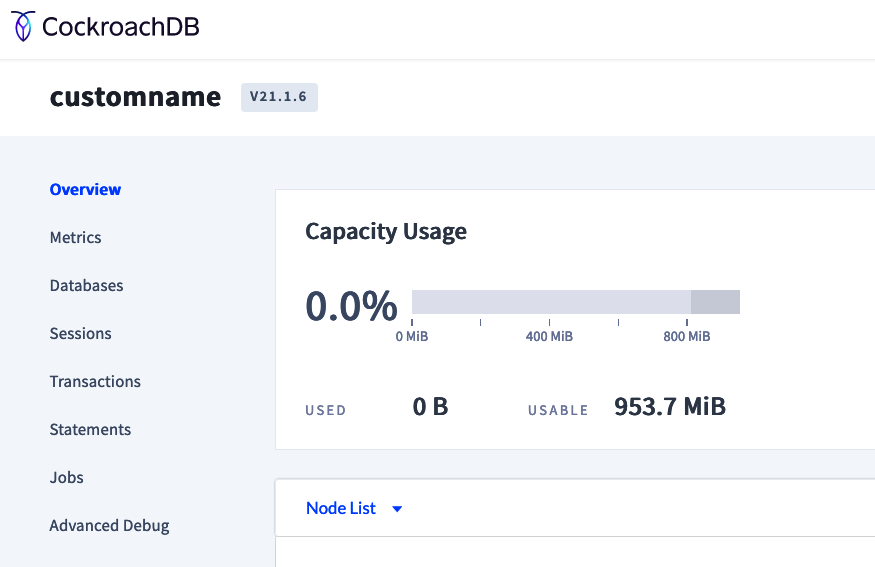
I just learned that cluster ID, usually a random UUID that appears on the DBConsole can be overridden with a customer-provided ID. You can do that using --cluster-name=<id> flag. Useful in environments with many clusters and arbitrary ID does not make it easy to remember which cluster is what.
 cockroach start-single-node \
  --background \
  --insecure \
  --http-addr=127.0.0.1:8080 \
  --advertise-addr=127.0.0.1:26257 \
  --cluster-name=customname
Topic 3: Sleep command in CockroachDB and PG
select pg_sleep(seconds);
will do exactly what you think it will do, sleep for the predetermined period of time in the SQL console
root@127.0.0.1:26257/defaultdb> select pg_sleep(10);
  pg_sleep
------------
    true
(1 row)

Time: 10.002s total (execution 10.002s / network 0.000s)
Topic 4: Set timezone on SQL Client
You can set timezone on client side using the following syntax
set timezone=default;
show timezone;
  timezone
------------
  UTC
Setting a custom timezone
set timezone="America/New_York";
show timezone;
      timezone
--------------------
  America/New_York
This works fine in case you are inside the interactive SQL shell but if you need to have timezone set upon SQL client initialization, you have to pass timezone as a parameter to the connection string
cockroach sql --url "postgresql://root@127.0.0.1:26257?sslmode=disable&timezone=America/New_York"
# Welcome to the CockroachDB SQL shell.
...
show timezone;
      timezone
--------------------
  America/New_York
Notice in the former case, we had to wrap the custom timezone in double quotes and in the case of connection string we don't have to.
Comments