Posts

Showing posts with the label Apps

CockroachDB with SQLAlchemy and MIT Kerberos

Today, I'm going to demonstrate how easily we can integrate a SQLAlchemy application running against a kerberized CockroachDB cluster. The experience building this appliation was almost too easy.

Exploring CockroachDB with Jupyter Notebook and R

Today, we're going to explore CockroachDB from the Data Science perspective again. We will continue to use Jupyter notebook but instead of Python, we're going to use the R language. I was inspired to write this post based on an article written by my colleague. I will build on that article by introducing Jupyter Notebook to the mix.

Exploring CockroachDB with Jupyter Notebook and Python

Today, we're going to explore CockroachDB from the Data Science perspective, using a popular exploratory web tool called Jupyter Notebook. I was inspired to write this post based on this article . The article goes over using Jupyter with Oracle, MySql and Postgresql, we're going to do the same with Cockroach! One caveat here is the heavy reliance on ipython-sql library. We're going to use Pandas library as the ipython-sql magic functions are not compatible with Cockroach today. Hopefully you will find it useful.

CockroachDB CDC using Hadoop Ozone S3 Gateway as cloud storage sink, Part 4

Today, we're going to evaluate Hadoop Ozone object store for CockroachDB object store sink viability. A bit of caution, this article only explores the art of possible, please use the ideas in this article at your own risk! Firstly, Hadoop Ozone is a new object store Hadoop Community is working on. It exposes an S3 API backed by HDFS and can scale to billions of files on prem! This article only scratches the surface, for everything there is to learn about Hadoop and Ozone , navigate to their respective websites.

Easy blogging with Blogger Tools

Image
I just found this feature in Blogger that definitely beats Ping.FM. Just to summarize, ping.fm lets me publish my posts written in an email. Limitations are that I cannot differentiate between micro-blogs and actual blog entries. So all my blogs would go to Twitter or Facebook and get cut off or small text entries would get published on my blog instead of Twitter. That creates a lot of mess. With this email feature on Blogger, I know exactly where it is going and I can control whether to publish right away or save as draft until later. To shorten the steps I created a contact in my Google Contacts called Blogger with email address created in Blogger, so if I have something to post, I can take a picture with iPhone let's say, embed it in an email send it to blogger contact and later publish the post. Easy and great, enjoy! -- Artem

MailStore App

Image
Sometimes you come across a killer app and you say where was this when I needed something like this? Well, at the end of last year, our Exchange guys made us copy our email manually to a network drive so that they could archive the emails. The task took me hours to backup my email. Today on Tekzilla, I hear about MailStore Home edition. It takes much less time to backup and archive email and you can burn it to CD/DVD media as well. It can archive mail from Exchange, Outlook/Express, Gmail, Hotmail, IMAP, POP3, etc. I am definitely impressed and highly recommend this tool, however, I didn't test restoring from DVD yet so use at your own risk. I recommend archiving email but not deleting it from source. Once you confirm it can be recovered, purge away! This is great if you want your email locally, off of those pesky Google servers. Enjoy! -- Artem

Fresh from the Boxee meetup - 411

Beta won't be available until "3rd quarter". New features in beta: search for content throughout all of the channels; customize the home screen with any favorite channels; multiple profiles; content filtering... New channels like PBS, appbox with BoxeeHQ can be added now, Pandora, some pr0n was added back (was requested apparently from users), games, other integration will be added via API. Boxee will stay a software-only company and let hardware manufacturers provide platforms. They are also thinking of doing trends, how long you've spent watching on Boxee. There were tons of news and you may find the livestream on boxee. Lastsly, Boxee will always remain free of charge and iphone app will also stay free. Watching content on iphone via boxee app will not happen anytime soon because they want to concentrate on computer to pc first.

My iTunes Podcasts

I think it's time I share some of my podcast subscriptions with you. There are a few resources on this list that I can't live without on daily basis and there are some that are still on temporarily while I review them. So here we go in alphabetical order: 1. The Apple Byte - CNET reviews all things Apple (V) 2. Apple Quick Tips - short tips from Apple on OSX, iPhone, etc. 3. The Art of Code - If you want to learn web development. 4. Ask The Techies - great resource on Windows and mostly Apple. 5. Best of Youtube - once a week, most popular Youtube video. 6. The Bleeding Edge - still reviewing. 7. Buzz Report - CNET tech news. 8. CNBC's "On The Money" - Financial tips and news. 9. CNET Live - CNET editors trying to answer caller questions. 10. CNET TV: Quick Tips - tips on anything techie. 11. CommandN - short news on tech. 12. Cranky Geeks - John C. Dvorak and other pundits talk about tech. 13. The Digg Reel - best of Digg.com videos. 14. dl.tv - all t...

Fences - an app similar to KDE 4 desktop folders

Image
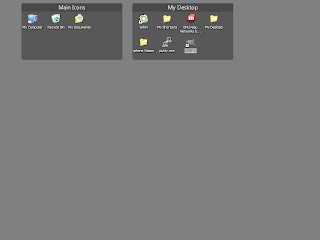
If you are familiar with the KDE 4 Desktop and would like to replicate some of the functionality on Windows, (besides installing KDE on Windows). Or If you just want to consolidate your messy desktop full of icons, I have a solution for you and it will cost you absolutely nothing! Install Fences from the creators of Stardock (Windows version of dock from Mac OSX or Avant Window Navigator for Linux). It allows you to drop all your icons into virtual folders on your desktop. Double click and folders disappear, double click again and they come back, magic... About time Windows, about time. Enjoy

My Most Frequently Used Apps at Home

There are apps that you most commonly use at home and at the office. This post will list my home apps: 1. iTunes - sync music and podcasts to my iPhone. 2. Yahoo Widgets - Wifi, weather, battery, cpu, clock widgets 3. Thunderbird Mail - I am more productive reading mail with Thunderbird than Gmail 4. Miro - iTunes cannot play everything, discover other podcasts Apple wouldn't show 5. VLC - a must have to view any video format under the sun. Never fails! 6. Notepad - duh 7. Command Prompt 8. Firefox - duh 9. CDBurnerXP - on Windows, K3B or Brasero on Ubuntu 10. Boxee and Plex - Media Center 11. Winpatrol - UAC and random settings for XP 12. Digsby - Best IM Client for Windows 13. Visual Task Tips - thumbnail review like Compiz and Vista/Windows7 14. iPhoneBrowser - just installed, browse iPhone internal directories 15. VirtualWin - toggle through multiple desktops on Windows - Spaces on Mac, Compiz 16. Update Checker - still beta but awesome tool to check application update...

VisualTaskTips as seen on Tekzilla

Visual Task Tips tool brings a small feature from Vista to XP. If you hover over a minimized window on your taskbar, it will show you a small thumbnail picture of the window. Great productivity booster and free! Get it

Spiceworks - monitoring and inventory

I was testing Spiceworks to find a nice alternative to a long overdue monitoring app for my SQL servers. It is still not sufficient for my application, however 5 minute demo to our IT director turned this into a tool our department cannot work without. The techs really embraced the tool because it allows for scenarios other tools cannot provide for. At least we havent come across anything this simple and cheap. Reporting against the inventory allows for any type of info, type of RAM, installed apps, virus info, etc. The app is free with ads, paid support and ad-free option also available. Highly recommend this tool for home and small shops, otherwise it can be pretty slow.

Miro: an intuitive application for your home media center

I personally use Boxee on my Mac Mini but I am always open to new things. Watching CNET Live yesterday, I heard Tom Merrit talk about Miro 2. I was curious to see what this application does and I was pleasantly surprised to find out that it's a podcast aggregation/media center for your computer. It works just like Boxee sans the social networking aspect. It lacks the GUI aesthetics of Boxee but it gains in functionality. First, it has a Windows client already. Second, you don't need to sign up for private alpha to run this software. Subscribing is as easy as clicking the subscribe button. Quality is amazing and it's a wonderful feeling that this amazing app is open source. I'm surprised I've never heard of it. I haven't played with it to give you a much better overview of it but I highly recommend this to anyone who didn't sign up for Boxee yet. You may search Youtube and Hulu videos straight from the interface that resembles iTunes but it runs so much more ...

iPhone shortcut

to insert a period '.' in a sentence without going to the special characters page, double tap the space bar and it will insert it and advance one space. That's if in keyboard settings you didn't change a setting to insert a period. This was a new one for me since I don't go to keyboard settings too often.

Google Reader

Reader got a few changes recently like an updated toolbar at the bottom, I'm used to the old look but it's fine. Also another very good feature is to share with notebook. Notebook is surprisingly an overlooked tool and it helps me a lot. Now instead of sharing with blogger I can share with my notebook and come back later to my notes. Thumbs Up!

Agile Mobile Update

Another Friday, another update. Downloading as I write this.. Will see what happens.

Agile Mobile Upgrade part 2

ok, there's a new update to Agile Messenger but so far I haven't seen any changes except for the welcome screen graphic looking more pleasant, I guess its a bug fix, if I do find something new, I'll holler.

Agile Mobile Upgrade

I got a new update notification for my Agile Mobile Messenger today when I started it up on my Motorola Q. I decided to upgrade and so far I've seen a few pleasant changes. Fonts have been changed and it's much better to look at my buddy list. Also, chats look much better with the new fonts and Sender/Receiver are in bold Red and Blue, very nice change from previous. I looked through the preferences and I don't see any functionality changes but aesthetics are nice. Perhaps it was a bug fix as well but I have no confirmation on that unless I keep using the messenger. If I find out more, I'll update the post. Update: Today I got another update, probably a bug fix after yesterday. Another noticeable feature is that now a new IM notification is not three continuous vibrations but one long vibration. Also, smiley face graphics are completely different than standard graphics and pretty cool.

Digsby is bringing out a Linux and Mac client very soon

Hey all, my new favorite multi-protocol IM client is soon to become a multi-platform client. It is still in beta and they're already rolling out a client for the other two platforms. It is a great news to me because I literally fell in love with Digsby on Windows and every time I find myself using Kopete or Pidgin on Linux I yearn for Digsby. It is just so great at what it does. Hope the Linux client is not crippled and offers just as many features as Windows. Sign up for notification here . p.s. Ars did a nice and simple review of Digsby here . Talk to you soon.

Octro Multi-platform client and VOIP

hello all, the moment I was waiting for is finally here. There's a new free Multi-platform IM client on the horizon and its called Octro . I heard it first today on Boy Genious Report and instantly downloaded it. Surprisingly, it is not screwing up my phone as bad as Fring did. The IM alert is same as Agile Messenger, GUI is similar but I think it has more options and it's still free while in beta. BGR reports that it will remain free. I didn't try a voice call yet but chatting works as it should. It has some functions unique to the installation that I didn't see on other apps. I really like color coding your messages and people you're chatting with and group chat functions. Agile is great but it is no longer free. One function that Octro has that Agile still didn't get right was opening web links. That finally works. Also, rendering long IM messages never worked well on Agile. This thing works well. So far I am fairly impressed and will probably ditch Agile on...